— FOR YOUR DISCIPLINE —
For every discipline,
the words that actually land.
Bring real space into the layout stage.
Lock the anime "shot" before you film.
3DGS data carries straight through layout → key animation → 3D compositing. It plugs into your AE / Blender / Maya / UE5 pipeline at real scale and real coordinates.
6 scenes where it makes a concrete difference in anime production
On-location reference for background art
Beyond the photo records your location researchers bring back, you take home the real-scale 3D space itself. Spatial inconsistencies are prevented in downstream BG painting.
Angle design for layout
From storyboard → layout, try out focal length, pan and tilt inside the real space. Layout instructions to your key animators gain resolution.
Compositing mecha and characters into real locations
With real-scale 3DGS + Unreal / Blender, run previs compositing of CG mecha into the real location. Lock movement lines, sightlines, and scale before the shoot.
A reference for the 3D compositing pipeline
Bring 3DGS data into AE / Mocha as a 3D tracking reference — the grounding data for live-action plate compositing and perspective alignment.
Building a location library
Stations, downtown districts, tourist spots, studios you shoot often — scan once and own it forever. Reusable across sequels, spin-offs, and multiple titles.
An alternative to distant and overseas location trips
For locations that are hard to visit, acquire scans through our partner network. Dramatically cuts research costs for titles set overseas.
Interoperable with major DCC and compositing tools
Blender / Maya
Load .ply via a 3DGS add-on and reuse it for camera design in the layout stage. Everything up to locked-off angle output for key animation is done in the browser + Blender.
After Effects
Anchor camera-tracking data from Mocha / SynthEyes / Blender to the real scale and real coordinates of the 3DGS. Alignment accuracy with 3D layers improves.
Unreal Engine 5
Import the 3DGS as-is and pre-check CG mecha and characters layered into the real space. Lock movement, runtime, and angles before the shoot.
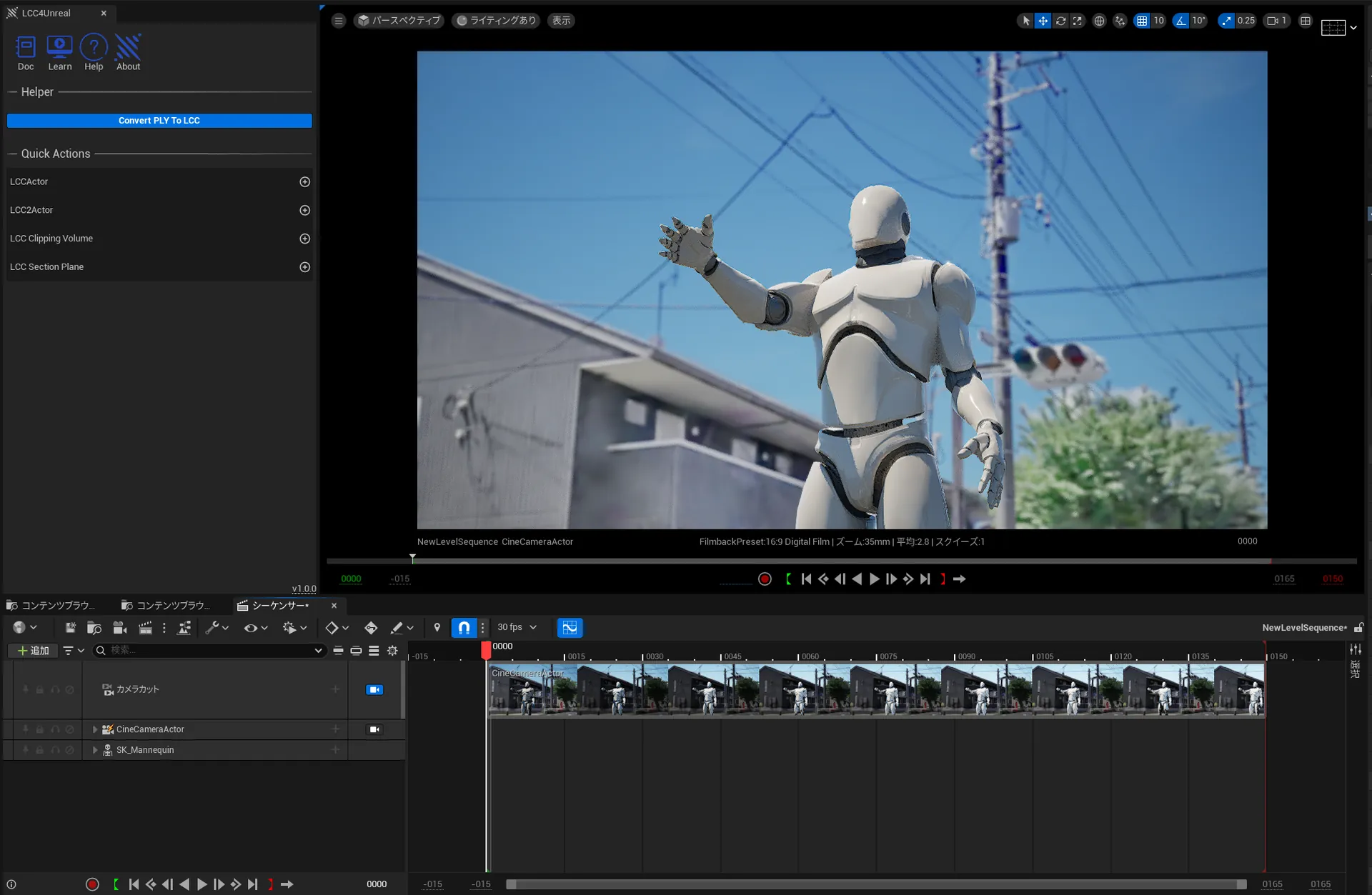
Validate the set before build day.
Don't bet load-in and dressing on the day.
Take the venue, studio, or location home as 3DGS, and overlay your set design, load-in routes, dressing layout, and lighting plan to validate before build. Crush the mismatches you'd otherwise discover on site — at your desk, first.
6 scenes where it makes a concrete difference in set design and on-site build
Consistency checks for set design
Drop the set 3D onto the venue's cm-accurate real space. Platforms that collide with a protruding pillar, leg curtains that block an opening — all caught at the design stage.
Pre-visualization for live and stage art
Sightline cutoffs from the audience, blind spots stage-left/stage-right, the drop position for the riff — validate from changing viewpoints, all settled at the design stage.
Load-in routes, ceiling load, power planning
Truck parking, door widths, corridor protrusions, the ceiling lighting grid, outlet positions — measure it all, then design.
Layout preview for dressing and props
The art director provisionally places dressing inside the 3D space. Eliminate the "it looked different once we tried it on site." Locked before you order.
Overlaying the lighting plan
Overlay the lighting team's HDRI / fixture-position plan onto the same 3DGS data, and check shadows, reflections, and sightlines for consistency in advance.
Building consensus with the director
Explain with viewpoint images from inside the 3D space, not elevation drawings. Revision notes gain resolution, and retakes drop.
Interoperable with the set-design process
SketchUp / Vectorworks
On the real-space base exported from 3DGS, place sets, dressing, and fixtures in 3D. The gap between elevation drawings and the finished look disappears.
Blender / Maya
Load .ply with the 3DGS add-on and pre-check lighting and perspective. For aligning CG previs with set design.
FHD JPEG with metadata
For design reviews and on-site briefing materials, output images carrying viewpoint and camera info. Shared materials for the venue and the build team.
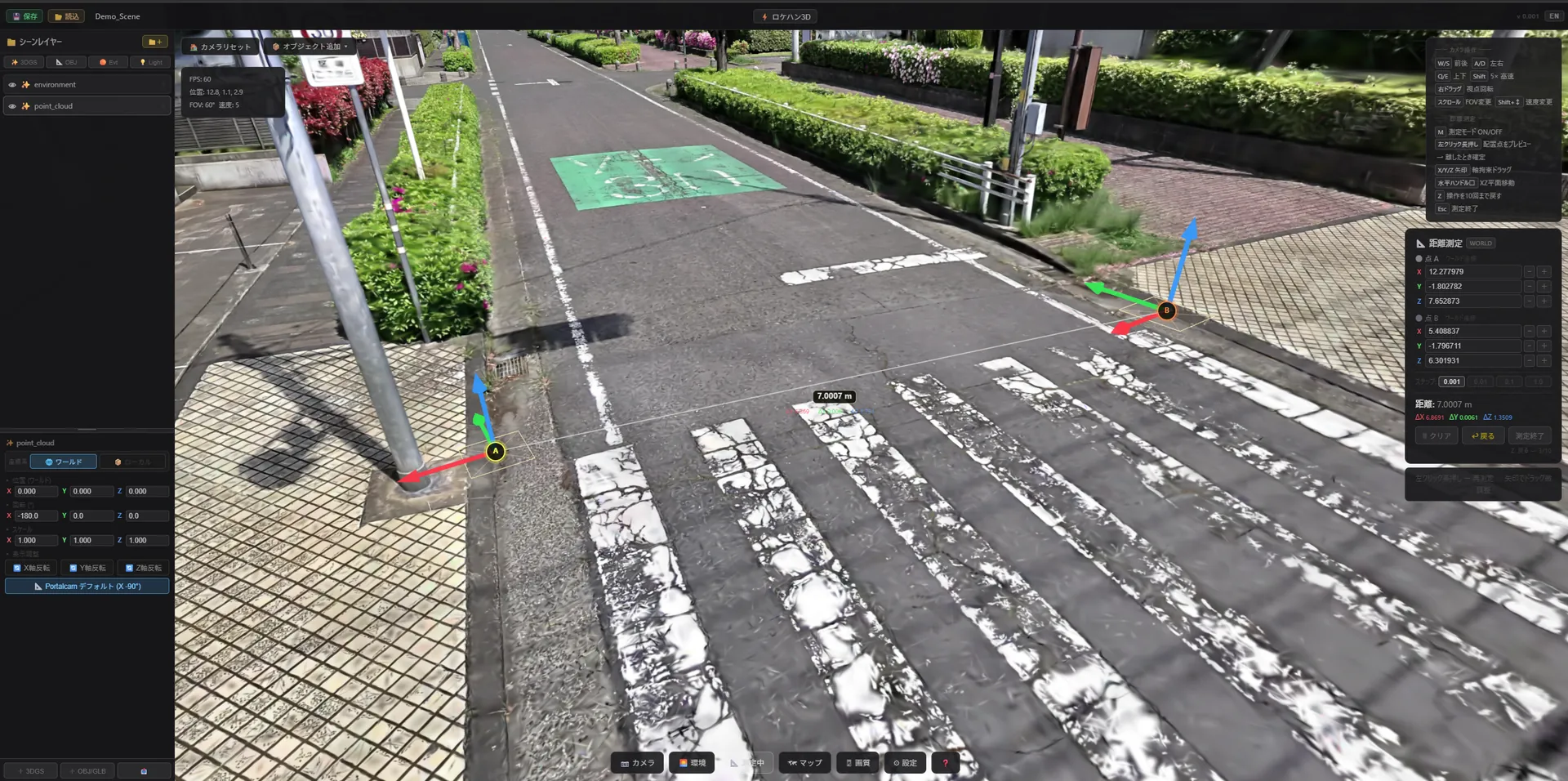
Materials that connect to the set.
Win the pitch and the shot list with 3D.
Client proposals, location comparisons, the rationale behind your shot list — hand "what the final shot will actually look like" to your team and client as images, before the shoot. Close the gap between production's decision speed and the set's resolution.
6 scenes where it makes a concrete difference in production work
Client pitch materials
Attach a "this is what it'll look like shot on location" finished-look JPEG to your pitch deck. Decision speed and win rates rise.
Comparing candidate locations
Compare 3 candidates side by side at the same angle and same lighting conditions. Consensus with client and director moves fast.
Rationale for the shot list
Attach 3D viewpoint images to the cut sheet. Agree on each cut's feasibility, runtime, and difficulty in advance.
Communication across crew
Director, camera, art, lighting — get everyone talking off the same JPEG. Fewer revisions and rejections.
Pre-visualizing risk
Load-in routes, power, sun position, weather. Crush the near-misses of shoot day before the shoot.
Archiving past projects
Sequels, re-shoots, and retakes at the same location. Position and settings restore instantly from a past JPEG. Efficiency on recurring projects changes.
Effective at every phase from planning to delivery
Client pitch
Attach a "location-based finished look" to proposal materials. Deck persuasiveness and decision speed change.
Shot list & cut sheet
Attach reference images from the 3D view to each cut. Instructions to camera, art, and lighting gain resolution.
Pre-visualizing risk
Load-in routes, power, sun position from weather — crush the near-misses of shoot day before the shoot.
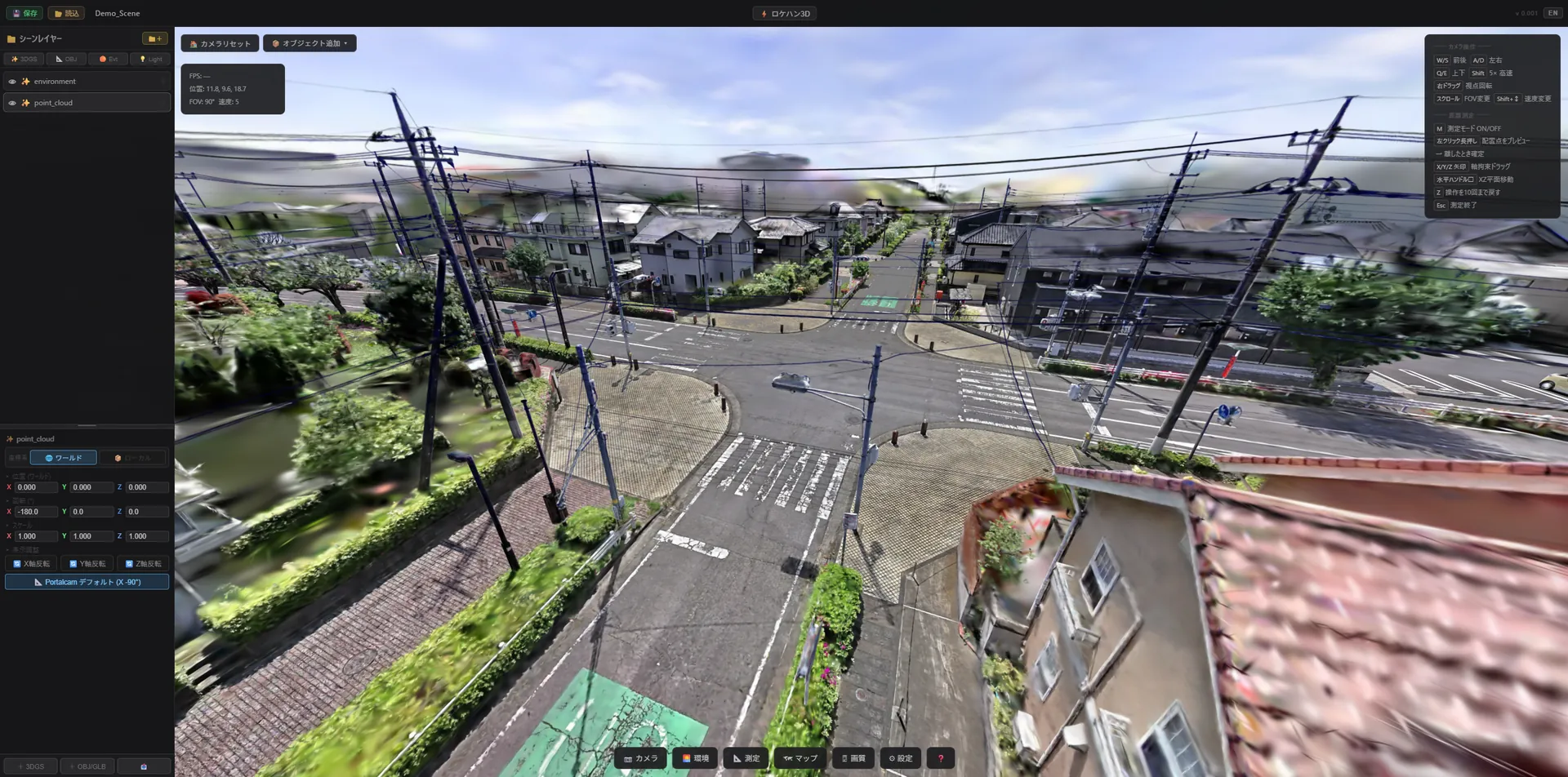
Lens selection, finished at your desk.
On the day, focus on shooting.
14 / 24 / 35 / 50 / 85mm — there's no time to try them all on set.
With a 3DGS scan and a virtual camera, try sensor, focal length, pan/tilt, and time of day before the shoot. On the day, you're ready to press the shutter without hesitation.
6 scenes where it makes a concrete difference on the camera department's set
Lens selection and focal-length trials
Compare 14/24/35/50/85mm at the same viewpoint and same subject distance. Lock the lenses you'll bring before the shoot.
Composition with grid overlays
Rule of thirds, golden ratio, diagonal, AE-compatible safe, custom. With multiple simultaneous overlays, find the optimal composition before the shoot.
Lighting study by time of day and weather
Recolor with pseudo-HDRI for morning, noon, dusk, night, and rain. Check sun position, shadow length, and reflection direction before the shoot.
Movement checks for special equipment
Crane, gimbal, drone, Steadicam — simulate camerawork inside the 3D space in advance. Lock safety, runtime, and sightlines.
Angle consensus with the crew on set
Director, AC, focus puller, sound — build the "this is the shot" agreement before the shoot off the same JPEG.
Salvaging the position of past shots
Drop a past JPEG and camera position, angle, focal length, and WB all restore instantly. Return to the exact spot, again and again, for sequels and retakes.
Make the difference with lens, composition, and salvage
Confidence in lens selection
Walk into the shoot having tried all of 14/24/35/50/85mm. Optimize the lens package you bring to set.
Composition grids
Rule of thirds, golden, diagonal, AE-compatible safe, custom — study composition with multiple overlays. AE integration keeps it consistent with post.
Position salvage
Drop a past JPEG and that day's camera position, angle, and all settings restore instantly. Call back the decisive shot for sequels, retakes, and replacements.
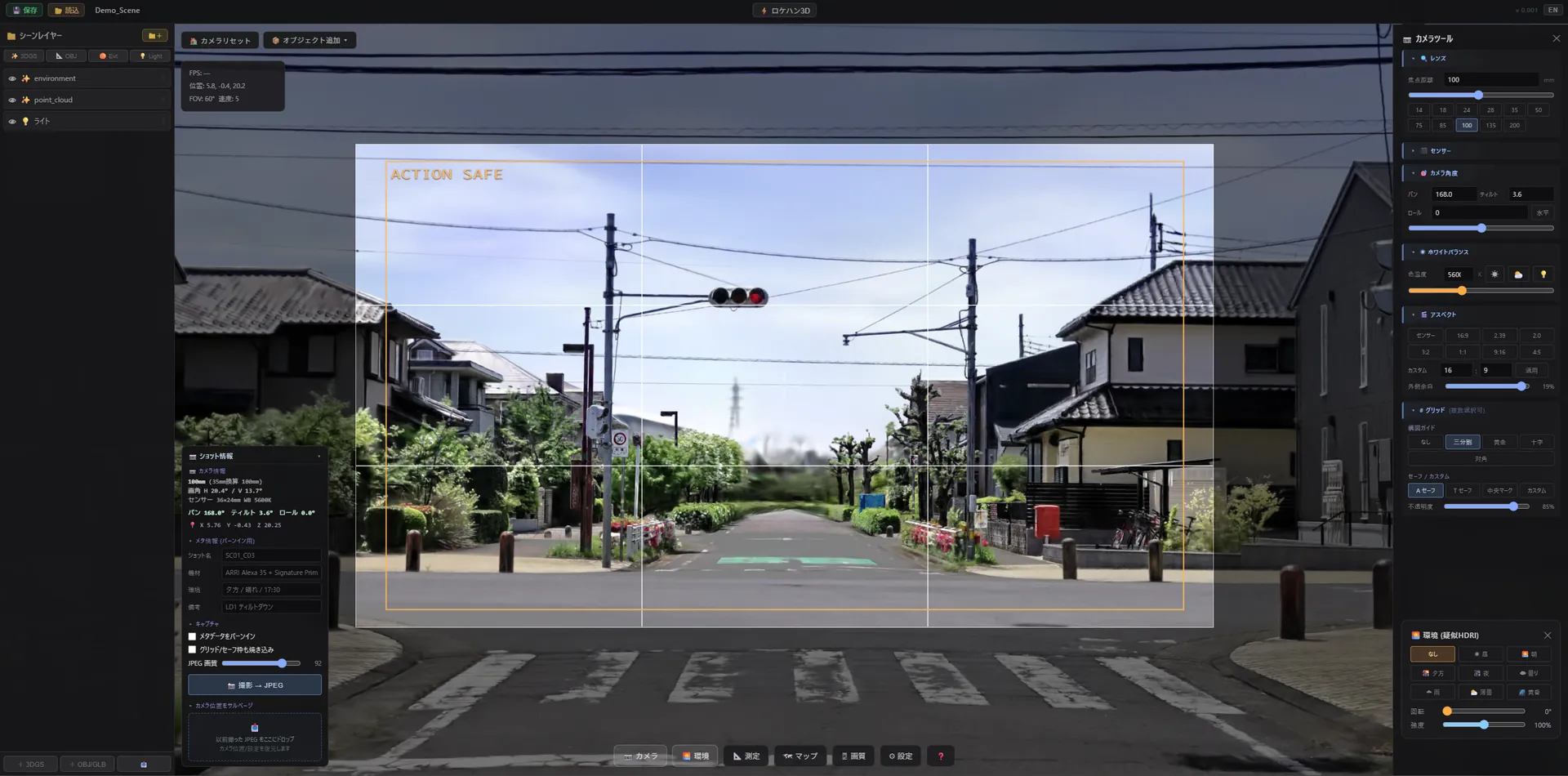
The final alignment of live action and CG,
captured on location.
Take the location home in 3DGS at real scale and real coordinates, and use it directly as a 3D tracking reference, perspective baseline, and environment-light reference. Feed location-based grounding data into your Blender / Maya / Houdini / Nuke / After Effects pipeline.
6 scenes where it makes a concrete difference in VFX production
A reference for 3D camera tracking
Because 3DGS is captured at real-world scale, it can be used as-is as a tracking reference for Mocha / SynthEyes / 3DEqualizer. Matchmove alignment accuracy rises.
A perspective baseline for plate compositing
The grounding data for scale and perspective alignment when placing CG elements onto live-action plates. A starting point for 3D-layer design in AE / Nuke.
Environment-light / HDRI reference
Because 3DGS records the look at the time of shooting as-is, it works as lighting reference material and a pseudo-HDRI starting point. You can fill in an HDRI you failed to capture.
Mesh and texture extraction
Conversion from 3DGS to mesh + texture is also supported. There's a path to rebase props and set elements as VFX assets.
Previs / layout
Import into Unreal / Blender and place CG characters and mecha in the real space. Lock movement, runtime, and angles before the shoot.
Archiving and reusing past assets
Sequels, replacements, and spin-offs at the same location or set. 3DGS is a permanent asset you can reuse any number of times.
Inject it straight into the VFX pipeline
Blender / Maya / Houdini
Load .ply via a 3DGS add-on or plugin. For 3D tracking reference, perspective matching, and lighting reference.
Mocha / SynthEyes / 3DEqualizer
Pass camera-tracking data exported against the real coordinates of the 3DGS, and lift alignment accuracy.
After Effects / Nuke
As a scale and perspective baseline for 3D layers. FHD JPEG (with metadata) works as standing project reference material.
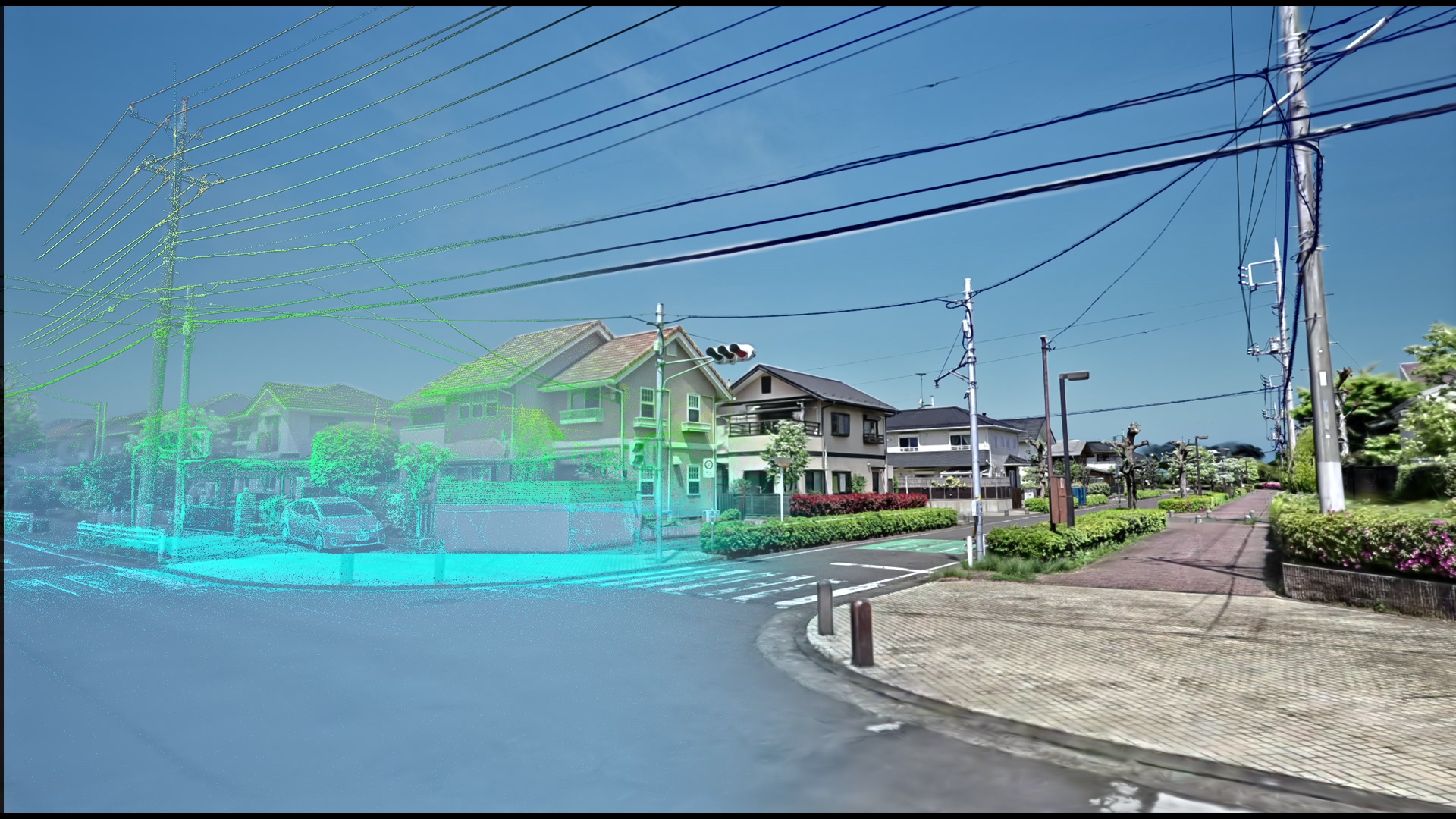
Exhibit your studio in 3D.
Fill the lost opportunities of distance and peak season.
For operators of rental studios, house studios, and shoot-ready facilities.
Scan your property once in 3DGS and it directly drives
in-browser viewings, inquiries from afar, and better discoverability during vacancies.
It also lays the groundwork to broaden your exposure to production teams on the upcoming locahun3d.com.
6 scenes where it makes a concrete difference for studio operators
In-browser viewings
Production teams can check the property in 3D without visiting. No scheduling, no in-person viewing — show the facility with a single web URL.
Winning distant and regional productions
A Kansai or Kyushu production considers a Kanto property; a Tokyo production considers a facility for regional shoots — evaluated across distance. Your inquiry base widens.
Monetizing vacancies and the off-season
An always-on online exhibit via a 3DGS link. Awareness during the off-season and vacancies grows, lifting utilization.
Private mode
Sensitive properties are viewable by invite link only. Switch public/private per project. Reconcile confidentiality and reach.
Repeat relationships with productions
Productions that have shared the 3DGS data across their team come back to the same facility more easily. Named bookings happen for sequels, replacements, and annual projects.
Listing on locahun3d.com (planned 2027)
Win bookings from productions + search traffic through marketplace features. Early partners are slated for preferential treatment with launch listing slots.
One scan, turned into a permanent asset
Free or low-cost scan
As an early-partner condition, scan costs are discounted. A 30–60 minute walkthrough turns the whole facility into 3DGS.
Just receive a URL
Within 1–2 business days of the scan, we deliver a single dedicated URL. No server setup or hosting — just paste it into email / social / your own site for zero operational overhead.
Marketplace integration
At the locahun3d.com launch, listed with priority as an early listing slot. Prioritized in the design of the fee model and booking flow.
Start with a 30-minute live demo,
tailored to the context of your set.
If you can share reference material from your project,
we'll prepare a scan example + app demo matched to that context and bring it to you.